This notebook shows the recommended Hugging Face workflow for the point-process model from Berghaus et al. (2026): load the pretrained model with AutoModel.from_pretrained(...), download a small example dataset from the Hub, prepare the context/inference tensors, visualize the inferred intensities, and finish with a fine-tuning command template.
import warnings
warnings.filterwarnings("ignore")
from transformers.utils import logging
logging.disable_progress_bar()
from datasets.utils.logging import disable_progress_bar
disable_progress_bar()
%matplotlib inline
from pathlib import Path
import torch
from huggingface_hub import snapshot_download
from pp_tutorial_helper import load_hawkes_tensors, move_to_device, plot_intensity_comparison, prepare_hawkes_batch
from transformers import AutoModel
if torch.cuda.is_available():
device = torch.device("cuda")
else:
if torch.backends.mps.is_available():
print("MPS is not yet supported for this FIM-PP tutorial path; using CPU instead.")
device = torch.device("cpu")
deviceMPS is not yet supported for this FIM-PP tutorial path; using CPU instead.
device(type='cpu')Load the Pretrained Model
The standardized user-facing path is now the Transformers AutoModel interface.
model_root = Path(snapshot_download(repo_id="FIM4Science/fim-pp", repo_type="model"))
model = AutoModel.from_pretrained(model_root, trust_remote_code=True)
model = model.to(device)
model.eval()
FIMHawkes(
(mark_encoder): Linear(in_features=22, out_features=256, bias=True)
(time_encoder): SineTimeEncoding(
(linear_embedding): Linear(in_features=1, out_features=1, bias=True)
(periodic_embedding): Sequential(
(0): Linear(in_features=1, out_features=255, bias=True)
(1): SinActivation()
)
)
(delta_time_encoder): SineTimeEncoding(
(linear_embedding): Linear(in_features=1, out_features=1, bias=True)
(periodic_embedding): Sequential(
(0): Linear(in_features=1, out_features=255, bias=True)
(1): SinActivation()
)
)
(evaluation_mark_encoder): Linear(in_features=22, out_features=256, bias=True)
(context_summary_pooling): AttentionOperator(
(res_layers): ModuleList(
(0): ResidualAttentionLayer(
(attn): MultiheadAttention(
(out_proj): NonDynamicallyQuantizableLinear(in_features=256, out_features=256, bias=True)
)
(linear1): Linear(in_features=256, out_features=2048, bias=True)
(dropout): Dropout(p=0.1, inplace=False)
(linear2): Linear(in_features=2048, out_features=256, bias=True)
(norm1): LayerNorm((256,), eps=1e-05, elementwise_affine=True, bias=True)
(norm2): LayerNorm((256,), eps=1e-05, elementwise_affine=True, bias=True)
(dropout1): Dropout(p=0.1, inplace=False)
(dropout2): Dropout(p=0.1, inplace=False)
(activation): ReLU()
)
)
)
(context_ts_encoder): TransformerEncoder(
(layers): ModuleList(
(0-3): 4 x TransformerEncoderLayer(
(self_attn): MultiheadAttention(
(out_proj): NonDynamicallyQuantizableLinear(in_features=256, out_features=256, bias=True)
)
(linear1): Linear(in_features=256, out_features=2048, bias=True)
(dropout): Dropout(p=0.0, inplace=False)
(linear2): Linear(in_features=2048, out_features=256, bias=True)
(norm1): LayerNorm((256,), eps=1e-05, elementwise_affine=True, bias=True)
(norm2): LayerNorm((256,), eps=1e-05, elementwise_affine=True, bias=True)
(dropout1): Dropout(p=0.0, inplace=False)
(dropout2): Dropout(p=0.0, inplace=False)
)
)
)
(context_summary_encoder): TransformerEncoder(
(layers): ModuleList(
(0-1): 2 x TransformerEncoderLayer(
(self_attn): MultiheadAttention(
(out_proj): NonDynamicallyQuantizableLinear(in_features=256, out_features=256, bias=True)
)
(linear1): Linear(in_features=256, out_features=2048, bias=True)
(dropout): Dropout(p=0.0, inplace=False)
(linear2): Linear(in_features=2048, out_features=256, bias=True)
(norm1): LayerNorm((256,), eps=1e-05, elementwise_affine=True, bias=True)
(norm2): LayerNorm((256,), eps=1e-05, elementwise_affine=True, bias=True)
(dropout1): Dropout(p=0.0, inplace=False)
(dropout2): Dropout(p=0.0, inplace=False)
)
)
)
(ts_decoder): TransformerDecoder(
(layers): ModuleList(
(0-3): 4 x TransformerDecoderLayer(
(self_attn): MultiheadAttention(
(out_proj): NonDynamicallyQuantizableLinear(in_features=256, out_features=256, bias=True)
)
(multihead_attn): MultiheadAttention(
(out_proj): NonDynamicallyQuantizableLinear(in_features=256, out_features=256, bias=True)
)
(linear1): Linear(in_features=256, out_features=2048, bias=True)
(dropout): Dropout(p=0.0, inplace=False)
(linear2): Linear(in_features=2048, out_features=256, bias=True)
(norm1): LayerNorm((256,), eps=1e-05, elementwise_affine=True, bias=True)
(norm2): LayerNorm((256,), eps=1e-05, elementwise_affine=True, bias=True)
(norm3): LayerNorm((256,), eps=1e-05, elementwise_affine=True, bias=True)
(dropout1): Dropout(p=0.0, inplace=False)
(dropout2): Dropout(p=0.0, inplace=False)
(dropout3): Dropout(p=0.0, inplace=False)
)
)
)
(input_layernorm): LayerNorm((256,), eps=1e-05, elementwise_affine=True, bias=True)
(mu_decoder): MLP(
(layers): Sequential(
(linear_0): Linear(in_features=512, out_features=256, bias=True)
(activation_0): GELU(approximate='none')
(dropout_0): Dropout(p=0.0, inplace=False)
(linear_1): Linear(in_features=256, out_features=256, bias=True)
(activation_1): GELU(approximate='none')
(dropout_1): Dropout(p=0.0, inplace=False)
(output): Linear(in_features=256, out_features=1, bias=True)
)
)
(alpha_decoder): MLP(
(layers): Sequential(
(linear_0): Linear(in_features=512, out_features=256, bias=True)
(activation_0): GELU(approximate='none')
(dropout_0): Dropout(p=0.0, inplace=False)
(linear_1): Linear(in_features=256, out_features=256, bias=True)
(activation_1): GELU(approximate='none')
(dropout_1): Dropout(p=0.0, inplace=False)
(output): Linear(in_features=256, out_features=1, bias=True)
)
)
(beta_decoder): MLP(
(layers): Sequential(
(linear_0): Linear(in_features=512, out_features=256, bias=True)
(activation_0): GELU(approximate='none')
(dropout_0): Dropout(p=0.0, inplace=False)
(linear_1): Linear(in_features=256, out_features=256, bias=True)
(activation_1): GELU(approximate='none')
(dropout_1): Dropout(p=0.0, inplace=False)
(output): Linear(in_features=256, out_features=1, bias=True)
)
)
(event_sampler): EventSampler()
)Download Example Data
The tutorial dataset is stored as raw tensors on Hugging Face. We download the snapshot and load the .pt files directly.
dataset_root = Path(snapshot_download(repo_id="FIM4Science/10D-Hawkes", repo_type="dataset"))

tensors = load_hawkes_tensors(dataset_root)
sorted(tensors)
['event_times', 'event_types']Build a Context / Inference Batch
We hold out a single path for inference and use the remaining paths as context. The helper also builds a dense evaluation grid for plotting the intensity curves between events.
batch = prepare_hawkes_batch(tensors, sample_idx=0, inference_path_idx=0, num_points_between_events=10)
batch = move_to_device(batch, device)

for key, value in batch.items():
    if torch.is_tensor(value):
        print(f"{key}: {tuple(value.shape)}")
    else:
        print(f"{key}: {value}")
context_event_times: (1, 1999, 100, 1)
context_event_types: (1, 1999, 100, 1)
context_seq_lengths: (1, 1999)
inference_event_times: (1, 1, 100, 1)
inference_event_types: (1, 1, 100, 1)
inference_seq_lengths: (1, 1)
intensity_evaluation_times: (1, 1, 1100)
num_marks: 10
Run Zero-Shot Inference
with torch.no_grad():
    output = model(batch)

sorted(output.keys())
['intensity_function', 'losses', 'predicted_intensity_values']fig=plot_intensity_comparison(output, batch, path_idx=0)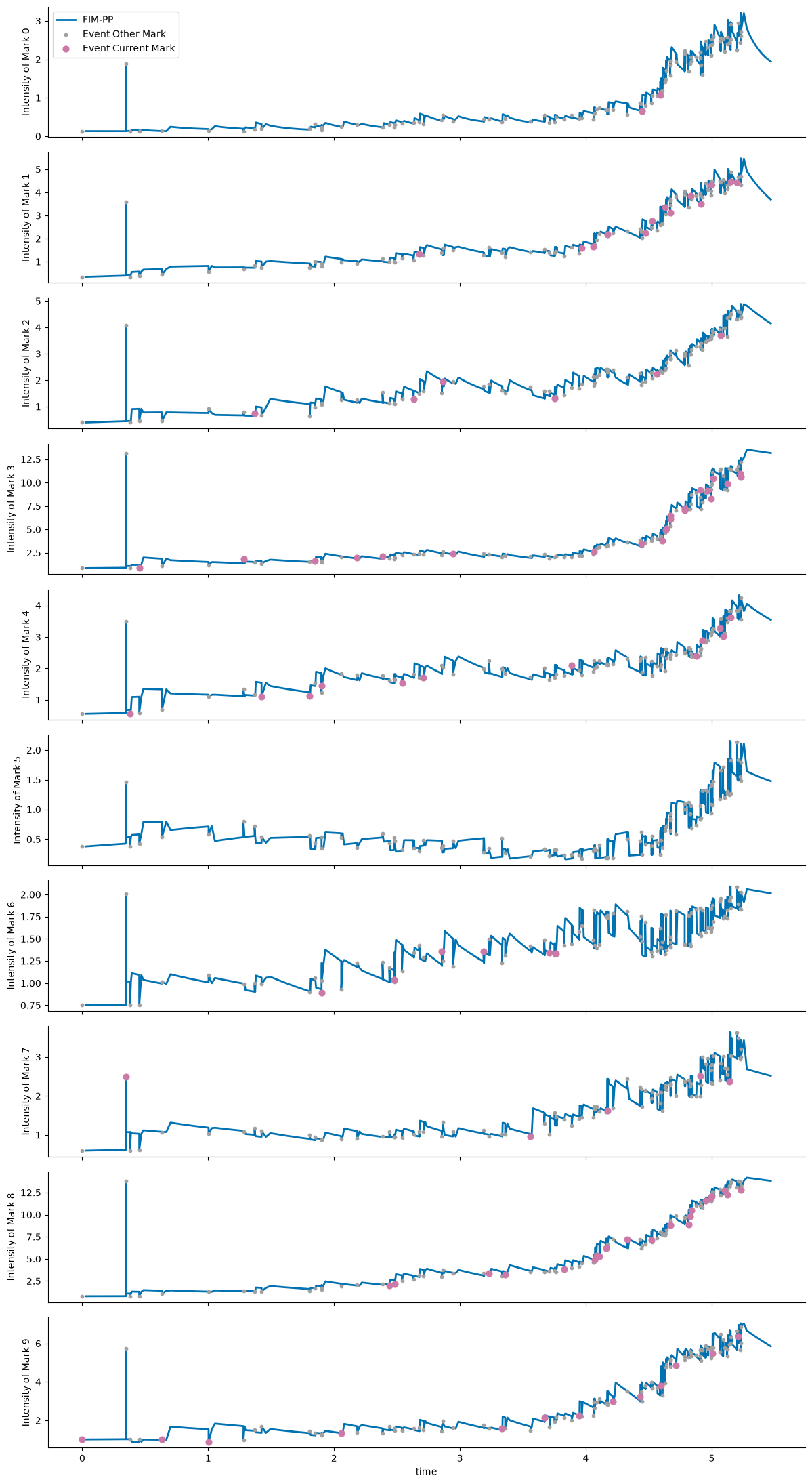
Fine-Tuning Starting from FIM-PP
A short fine-tuning run can be started with the existing Hawkes entrypoint. The point-process checkpoint is the initialization source, while the dataset can be either a local tensor folder or an EasyTPP dataset id.
For this tutorial, the 10D-Hawkes snapshot is used for inference and visualization. The fine-tuning CLI was smoke-tested with easytpp/retweet, which matches the expected training layout directly.
Use the downloaded model directory from the earlier snapshot_download(...) call as --resume_model. The script accepts either that directory or a specific file inside it such as model-checkpoint.pth.
python scripts/hawkes/fim_finetune.py \
  --config configs/train/hawkes/david.yaml \
  --dataset easytpp/retweet \
  --resume_model /absolute/path/to/downloaded/fim-pp \
  --save_dir results/finetuned_cdiff \
  --epochs 200 \
  --val-every 10
If you use the notebook variable directly, --resume_model should point to model_root.
The fine-tuned model is written under save_dir/<dataset_name>/<timestamp>/. With the command above, a run on easytpp/retweet will be stored in a directory like results/finetuned_cdiff/retweet/260401-1430/, and the exported checkpoint will appear in best-model/ inside that folder.
If --save_dir is omitted, the script defaults to results/finetuned_cdiff/<dataset_name>/<timestamp>/.
For local debugging, the lower-level fallback fim.models.hawkes.FIMHawkes.load_model(...) is still available, but the primary public workflow should use AutoModel.from_pretrained(...).
- Berghaus, D., Seifner, P., Cvejoski, K., Ojeda, C., & Sánchez, R. J. (2026). In-Context Learning of Temporal Point Processes with Foundation Inference Models. The Fourteenth International Conference on Learning Representations. https://openreview.net/forum?id=h9HwUAODFP